

Microsoft Dynamics GP… to 2028 and beyond?
Time is running out for Microsoft Dynamics GP… What Are Your Options as the Roadmap Ends in 2028?
**Updated content** Attention, Dynamics GP users!
We need to have a serious chat. Did you know that the Dynamics GP roadmap is coming to an end in 2028? Yep, time is ticking away. But don’t fret just yet! We’re here to have an open and honest conversation about your options.
We want to ensure you’re well-prepared for what lies ahead with Dynamics GP. We understand that the business world moves fast, and relying on an outdated and unsupported ERP system can be risky business. That’s why we’re here to offer guidance and introduce you to exciting alternatives. So, grab a cup of coffee, sit back, and let’s navigate through this transition together. We’re here to help you secure the future of your business and uncover the fantastic opportunities that await. Let’s dive in!
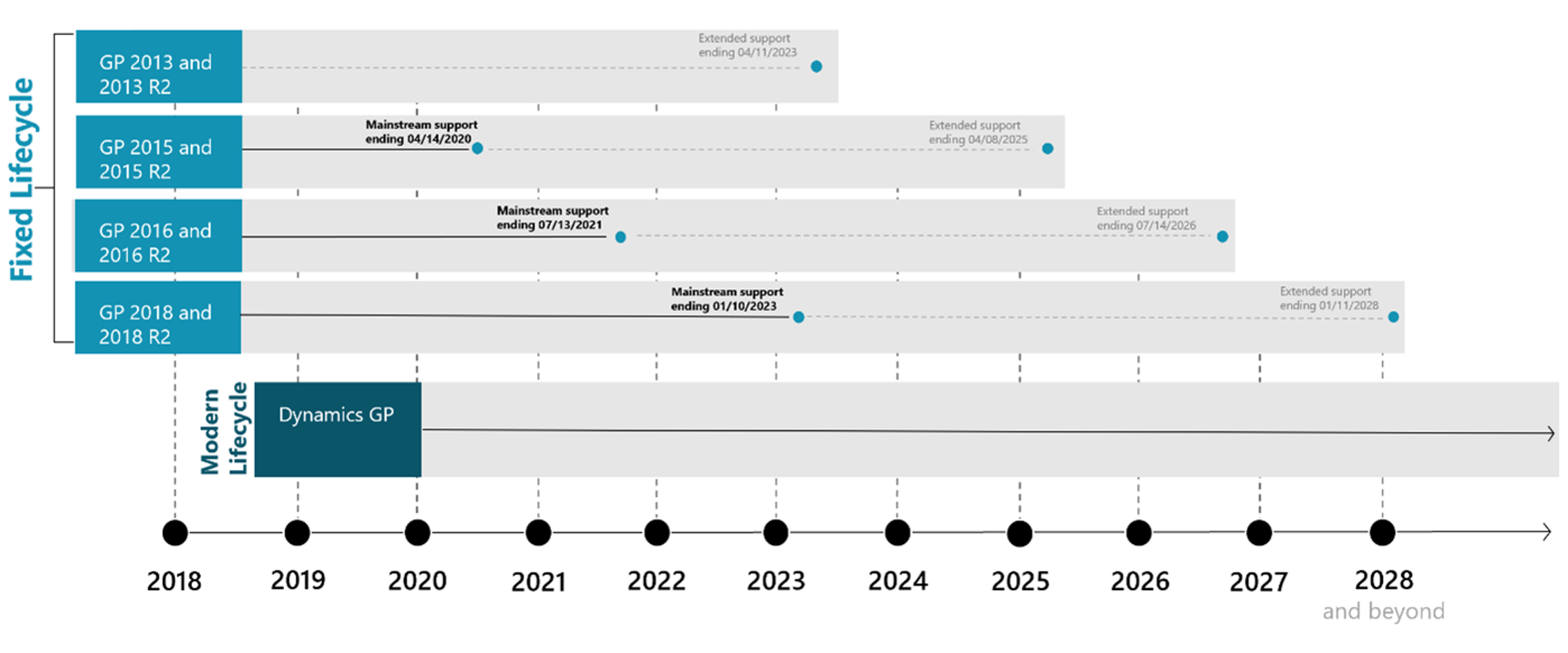
Now, let’s talk about the elephant in the room!
The potential risks and challenges of using an unsupported software.
As the Dynamics GP roadmap draws to a close, the implications for your business can be significant. First and foremost, without active support, critical updates, bug fixes, and security patches will no longer be provided. This leaves your system vulnerable to potential security breaches and puts your valuable data at risk. Moreover, as technology continues to advance, you may face compatibility issues with newer operating systems, hardware, or other software applications, hindering your ability to keep up with the evolving business landscape.
Additionally, without ongoing support, it becomes increasingly challenging to access reliable technical assistance when you encounter issues or need guidance. As your business strives for growth and efficiency, relying on an unsupported software can become a roadblock to achieving your goals. It’s crucial to proactively evaluate your options and ensure the continued success of your business.
The Importance of Planning Ahead

It’s crucial to take a proactive approach and plan for the future of your ERP system well in advance of the end of the Dynamics GP roadmap.
Waiting until the last minute can lead to unnecessary stress and potential disruptions to your business operations. By starting the planning process early, you give yourself ample time to evaluate alternative options and choose a solution that aligns with your long-term goals. Delaying the transition from an outdated and unsupported ERP system like Dynamics GP can expose your business to various risks.
Additionally, as your business grows and evolves, the limitations of an outdated system can hinder productivity, efficiency, and competitive advantage. Embracing a modern and supported ERP solution provides the necessary tools to adapt to changing business needs, stay ahead of the competition, and safeguard the future success of your organization.

“Microsoft will continue releasing GP regulatory & security updates, but the Oct 2022 release was the last release adding other new features. BC will be the focus of Microsoft’s investments in the SMB segment. To transform your business, we recommend moving to BC.”
by Mike Morton – Microsoft SVP
What are your options with or without Dynamics GP?
Option 1: [recommended]
Migrate to Dynamics 365 Business Central
Migrating to Dynamics 365 BC offers a compelling and future-proof option for GP users. Whether you migrate NOW or in 1, 2, or 3 years from now, let us help you plan the roadmap to your future life after GP.

As an innovative and cloud-based ERP solution, Business Central offers a seamless transition path, enabling you to harness the power of modern technology. By migrating to Business Central, you gain access to a robust suite of features designed to streamline your business processes.
Enjoy real-time visibility into your operations, enhanced collaboration, and the flexibility to adapt and scale as your business grows. Business Central’s user-friendly interface and intuitive navigation make it easy for your team to get up to speed quickly. Plus, with the continuous updates and support from Microsoft, you can rest assured that your ERP system will remain current, secure, and equipped to meet future challenges
Our team of experts is here to guide you through the migration process, ensuring a smooth transition and helping you maximize the benefits of Dynamics 365 Business Central. Say goodbye to the limitations of Dynamics GP and embrace the exciting possibilities that Business Central offers.
Option 2: [temporary option]
Host Dynamics GP on the Azure Cloud
For those who prefer to stick with Dynamics GP while leveraging the benefits of the cloud, hosting your Dynamics GP solution on Microsoft Azure offers an appealing alternative.

Azure provides a secure, scalable, and reliable cloud infrastructure that can enhance the performance and accessibility of your ERP system. By migrating Dynamics GP to the Azure cloud, you can gain advantages such as improved flexibility, increased data storage capacity, and reduced infrastructure maintenance costs. With robust security measures and reliable data backups, Azure offers you peace of mind ensuring the protection of your critical business information. Additionally, Azure seamlessly integrates with other Microsoft cloud services, enabling you to leverage additional tools and applications to drive productivity and collaboration. By choosing Azure, you can keep Dynamics GP relevant for your organization until you are ready to transition to Dynamics 365 Business Central.
Our team of Azure experts can assist you in smoothly transitioning your Dynamics GP, ensuring a seamless and efficient migration process. Explore the benefits of cloud hosting while retaining the familiarity and functionality of Dynamics GP with the power of Microsoft Azure.
GP to BC Experts | From Assessment to Migration
We understand that migrating from Dynamics GP to Business Central may raise concerns about the complexity and potential disruptions.
However, rest assured that the transition can be smooth and hassle-free with the right support. Our team is equipped with the expertise and experience to guide you through every step of the migration process. We provide comprehensive migration tools and resources specifically designed for Dynamics GP users, ensuring a seamless transfer of your data, configurations, and customizations to Business Central.
Our experts will work closely with you to understand your unique business requirements and tailor the migration plan accordingly. In addition, we highly recommend scheduling a Dynamics GP to Dynamics 365 Business Central assessment.
This assessment will allow us to analyze your existing GP environment, identify areas for improvement, and chart a roadmap for a successful transition. With our guidance and support, you can confidently embark on this journey, knowing that you have a dedicated team ready to assist you at every turn. Say goodbye to the worries of migration and let us pave the way for a seamless transition to Dynamics 365 Business Central.
